The best TikTok video size is 1080 × 1920 pixels, a 9:16 vertical frame. Export it as an MP4 with H.264 video, between 23 and 60 frames per second. TikTok also plays square and landscape videos, but with empty space around them, so they look smaller in the feed. Photo posts use the same 1080 × 1920, and your profile picture should be at least 200 × 200.
Here are all the specs, the parts of the screen TikTok's buttons cover, and export settings that keep your video sharp. Checked on 10 November 2026.
TikTok sizes at a glance
| What | Size | Notes |
|---|---|---|
| Video | 1080 × 1920 (9:16) | The full-screen size; 720 × 1280 is the lowest worth using |
| Square or landscape video | 1080 × 1080 or 1920 × 1080 | Plays with empty space above and below |
| Video formats | MP4 (recommended), MOV, WebM | H.264 video, AAC audio |
| Frame rate | 23 to 60 fps | Keep the rate you filmed at |
| File size through the API | Up to 4 GB | Tools that post for you use this route |
| Length | 10 minutes in the app; longer from a computer on many accounts | See how long TikToks can be |
| Photo post | 1080 × 1920 | JPEG or WebP, up to 35 images |
| Profile picture | 200 × 200 minimum; 400 × 400 or larger looks sharper | Shown as a circle |
| Caption | Up to 2,200 characters |
Sources: TikTok's media transfer guide for the API limits. TikTok doesn't publish one official spec sheet for in-app uploads; the rest are the sizes TikTok's own editor and camera produce. For every network's sizes in one place, use our image and video sizes tool.
TikTok video dimensions
TikTok is built for 9:16 vertical video at 1080 × 1920. That's the frame its camera records and the shape of a phone screen, so the video fills the whole display with nothing around it.
- 9:16 (1080 × 1920): use this for nearly everything.
- 1:1 (1080 × 1080): plays with space above and below. Fine for reposting square content, but it looks small.
- 16:9 (1920 × 1080): plays as a thin strip in the middle of the screen, with a prompt to rotate on some phones. Reframe it to vertical if you can.
Higher resolutions than 1080p are accepted, but most viewers see 1080p or lower in the feed, and larger files take longer to upload and process.
The TikTok safe zone
TikTok draws its interface over your video: the feed tabs at the top, a column of buttons down the right, and your username, caption and sound at the bottom. Text or faces under those get covered.
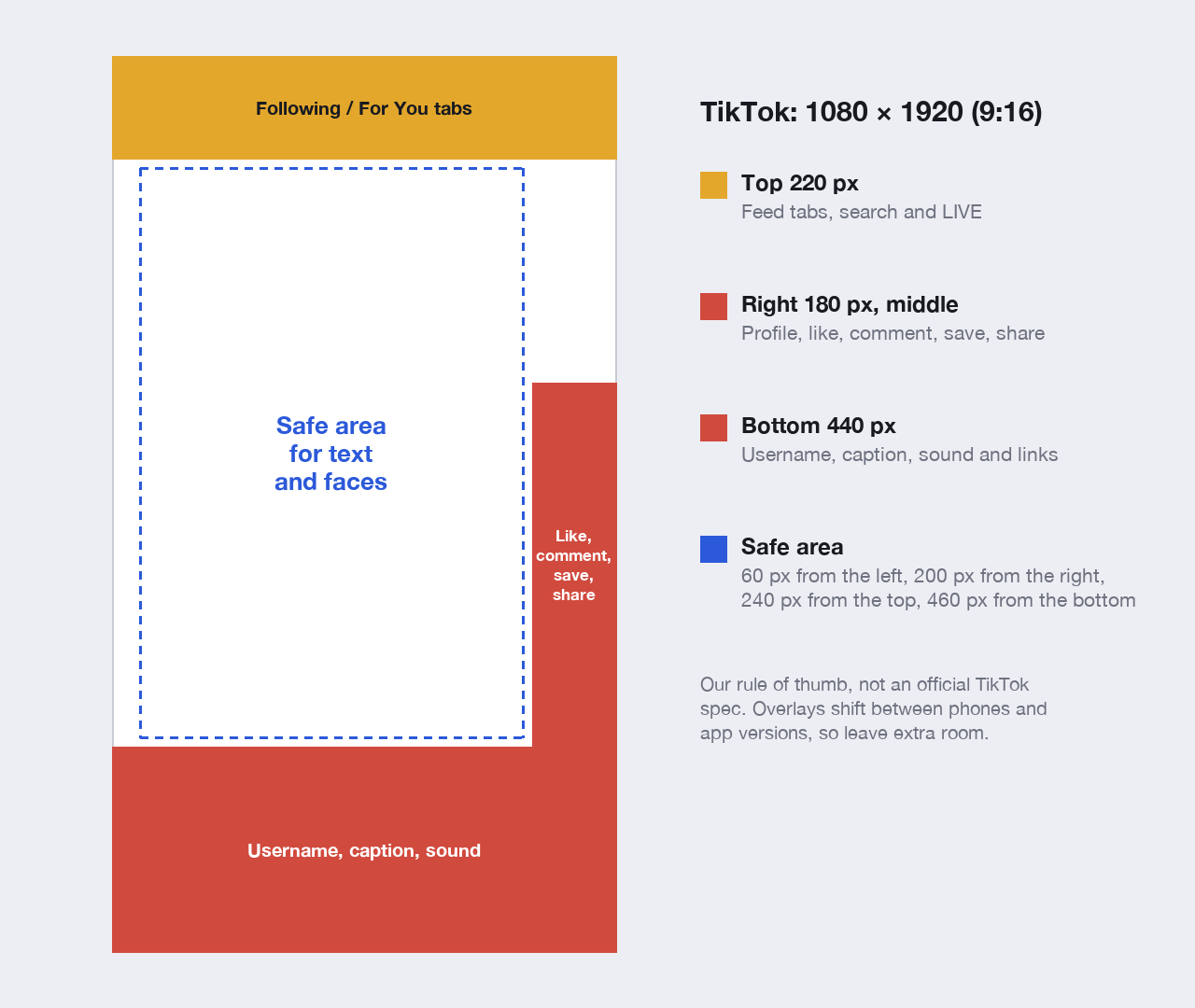
On a 1080 × 1920 video, a safe rule of thumb is to keep text and faces 60 pixels from the left, 200 from the right, 240 from the top and 460 from the bottom. That's our guideline rather than an official TikTok spec: the overlays move with captions, links and app versions, so leave a margin.
Two tips:
- On-screen captions belong about a third of the way up, not at the very bottom, where your caption and username sit.
- Long captions take up more room. The caption area at the bottom grows with your text, so keep key visuals higher if you write a lot.
Export settings for TikTok
- Resolution: 1080 × 1920.
- Format: MP4, H.264 video, AAC audio.
- Frame rate: the rate you filmed at, between 23 and 60 fps. Don't convert 30 fps footage to 60.
- Bitrate: around 8 to 12 Mbps for 1080p is plenty. TikTok recompresses everything, and a very high bitrate doesn't survive it.
TikTok photo post size
Photo posts (swipeable carousels with music) work best at 1080 × 1920, the same as video, so each photo fills the screen. Square and landscape photos are shown with space around them. You can add up to 35 photos. JPEG and WebP are accepted through TikTok's API.
TikTok profile picture size
Upload a square image of at least 200 × 200 pixels; 400 × 400 or larger keeps it sharp on high-resolution screens. TikTok shows it as a small circle, so keep your face or logo centred and simple. TikTok doesn't have a banner or cover image on profiles.
One vertical video for TikTok, Shorts and Reels
The same 1080 × 1920 file works on TikTok, YouTube Shorts and Instagram Reels, and the safe area above suits all three. Keep it to 3 minutes if you post it everywhere, since that's the Shorts and Reels limit. Our guide to YouTube Shorts size covers the YouTube side.
In Postbase you upload the vertical video once, choose TikTok and YouTube, set TikTok's privacy and interaction options, and schedule both. Large videos are uploaded to TikTok in parts, up to 4 GB. (Until TikTok approves Postbase for public posting, TikToks from Postbase go out as private, and you switch them to public in the app.) Here's how to schedule TikTok videos.
Available channels
Customize per channel
New on the shelf: Kochere, Ethiopia ☕️ Washed process, light roast. In the cup it's apricot, black tea and a little bergamot. Roasted Monday, shipped Tuesday. 40 bags this week, and they go fast.
Frequently asked questions
What is the best TikTok video size?
1080 × 1920 pixels, a 9:16 vertical frame. It fills the whole phone screen with no empty space.
What aspect ratio is TikTok?
9:16 vertical. TikTok also plays 1:1 square and 16:9 landscape videos, but they're shown with empty space and look smaller.
Can TikTok videos be 4K?
TikTok accepts higher-resolution files, but most viewers see 1080p or lower in the feed. Exporting at 1080 × 1920 uploads faster and usually looks the same.
What is the TikTok safe zone?
The part of the screen not covered by TikTok's buttons and text. On a 1080 × 1920 video, keep important things about 60 pixels from the left, 200 from the right, 240 from the top and 460 from the bottom.
What size is a TikTok profile picture?
At least 200 × 200 pixels, square. Use 400 × 400 or larger so it stays sharp. It's shown as a circle.
What size are TikTok photo posts?
1080 × 1920 pixels for full-screen photos. You can add up to 35 photos to one post.
Does TikTok have a banner size?
No. TikTok profiles have a profile picture but no banner or cover image.



 Postbase