The best YouTube Shorts size is 1080 × 1920 pixels, a 9:16 vertical frame. Any square or vertical video up to 3 minutes long counts as a Short, so 1080 × 1080 works too, but 9:16 fills the whole phone screen. YouTube's help says Shorts are uploaded at up to 1080p, so there's nothing to gain from exporting larger.
Below are all the specs, the parts of the screen YouTube's buttons cover, and how to reframe a landscape video. Checked against YouTube's help pages on 10 November 2026.
YouTube Shorts specs at a glance
| What | Spec |
|---|---|
| Best size | 1080 × 1920 pixels |
| Aspect ratio | 9:16 vertical (square 1:1 also counts) |
| Lowest worth using | 720 × 1280; lower looks soft on modern phones |
| Maximum resolution | 1080p, per YouTube's Shorts help page |
| Length | Up to 3 minutes |
| File type | MP4 with H.264 video and AAC audio is the safest choice |
| Frame rate | Keep the frame rate you filmed at: 24, 25, 30 or 60 fps |
| Thumbnail | 9:16, 2160 × 3840 recommended, from YouTube Studio on a computer |
Sources: YouTube Help, Get started creating YouTube Shorts and Upload YouTube Shorts up to 3 minutes. For every other network's sizes in one place, use our image and video sizes tool.
Does a Short have to be 9:16?
No. YouTube treats any video that's square or vertical (taller than it is wide) and 3 minutes or shorter as a Short. A 1:1 square video or a 4:5 portrait video is a Short too, but in the Shorts feed it's shown with empty space above and below, so it looks smaller and less immersive.
A 16:9 landscape video is never a Short, however short it is. It uploads as a regular video. If you want it in the Shorts feed, reframe it to vertical first (see below).
The YouTube Shorts safe zone
In the Shorts feed, YouTube puts its interface on top of your video: a bar at the top, a column of buttons down the right, and the channel name, caption and sound at the bottom. Keep titles, faces and on-screen text out of those areas.
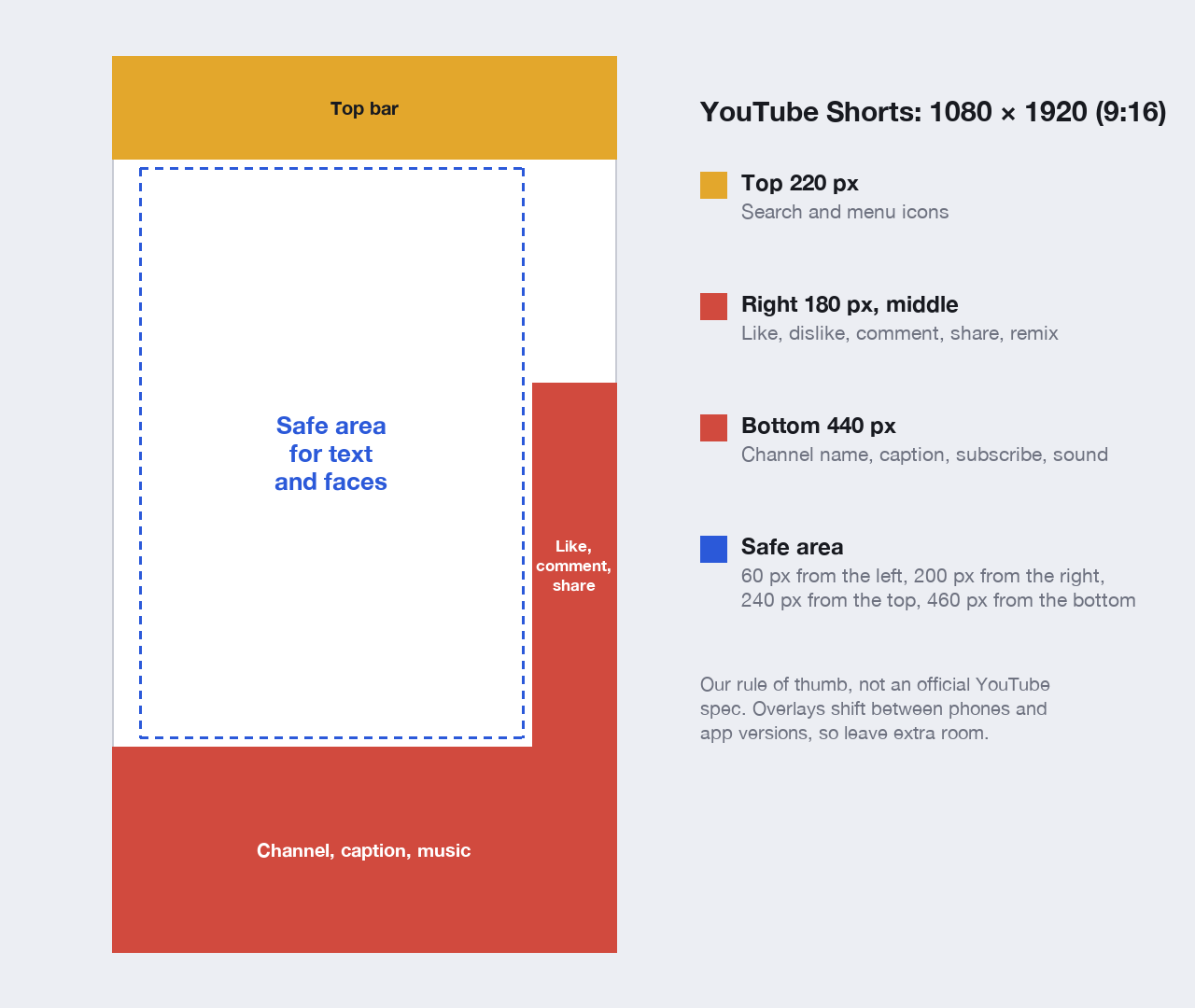
On a 1080 × 1920 Short, a safe rule of thumb is to keep anything important 60 pixels from the left, 200 from the right, 240 from the top and 460 from the bottom. That's our guideline rather than an official YouTube number: the exact overlays move between phones and app versions, so leaving a margin is safer than designing to the pixel.
Two common mistakes:
- Captions at the very bottom. Burned-in subtitles placed where they'd sit on TV end up under the channel name. Put them a third of the way up from the bottom.
- Text on the right edge. The like and comment buttons cover it. Centre or left-align on-screen text.
How to turn a landscape video into a Short
If you filmed in 16:9, you have three options:
- Crop to 9:16. Most editors (CapCut, Premiere Pro, DaVinci Resolve, Final Cut) can reframe to a 1080 × 1920 timeline and follow the subject automatically. Best when the action stays in one part of the frame.
- Split screen. Put the landscape video in the top half and something else, such as a face cam or a zoomed-in detail, in the bottom half.
- Letterbox it. Place the 16:9 video in the middle of a 9:16 frame with a background or caption above and below. Quick, but the video ends up small on screen.
Don't upload the 16:9 file and expect it to become a Short: it'll be a regular video.
Export settings for YouTube Shorts
- Resolution: 1080 × 1920.
- Format: MP4 (H.264 video, AAC audio).
- Frame rate: the one you filmed at.
- Bitrate: around 8 to 12 Mbps for 1080p at 30fps is plenty; a little more for 60fps.
- Length: 3:00 or less. A Short longer than one minute that gets a copyright claim is blocked, so keep anything with music or clips to 60 seconds. More in how long YouTube Shorts can be.
One vertical video for Shorts, TikTok and Reels
The same 1080 × 1920 file works on YouTube Shorts, TikTok and Instagram Reels, and 3 minutes is the length that fits all three. The overlays differ slightly between apps, so the safe area above, with its generous margins, covers all of them.
In Postbase you upload the vertical video once, pick YouTube and TikTok, and write the title and caption for each. YouTube classifies it as a Short automatically. (TikToks from Postbase go out as private for now, until TikTok approves it for public posting.) Here's how to schedule YouTube videos and Shorts.
Available channels
Customize per channel
New on the shelf: Kochere, Ethiopia ☕️ Washed process, light roast. In the cup it's apricot, black tea and a little bergamot. Roasted Monday, shipped Tuesday. 40 bags this week, and they go fast.
Frequently asked questions
What size is a YouTube Short?
1080 × 1920 pixels, a 9:16 vertical frame. Square 1080 × 1080 also counts as a Short, but 9:16 fills the screen.
What aspect ratio are YouTube Shorts?
9:16 is best. Any square or vertical ratio counts as a Short, as long as the video is 3 minutes or shorter. 16:9 landscape videos never count.
Can YouTube Shorts be 4K?
YouTube's Shorts help says Shorts can be uploaded at up to 1080p, so 1080 × 1920 is the size to export. A larger file won't look sharper in the Shorts feed.
Can I upload a horizontal video as a YouTube Short?
Not as it is. A 16:9 video uploads as a regular video. Crop or reframe it to 9:16 (or square) first.
What is the YouTube Shorts safe zone?
The area not covered by YouTube's buttons and text. On a 1080 × 1920 Short, keep important things about 60 pixels from the left, 200 from the right, 240 from the top and 460 from the bottom.
What is the YouTube Shorts thumbnail size?
9:16, with 2160 × 3840 recommended and a minimum height of 640 pixels. Custom Shorts thumbnails can only be uploaded from YouTube Studio on a computer. See our YouTube thumbnail size guide.
Is 720p OK for YouTube Shorts?
It works, but it looks soft on most modern phones. Export at 1080 × 1920 if your footage allows.



 Postbase